


Xiaomi Home
4.45.83K Reviews
App Specs
- Version
- 11.6.704
- Updated On
- License
- Free
- Downloads
- 50,000,000+
- Developer
- Beijing Xiaomi Mobile Software Co.,Ltd
- Categories
- Lifestyle
- Platform
- Android, iOS
Screenshots
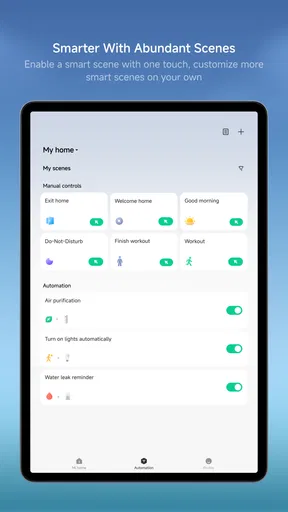
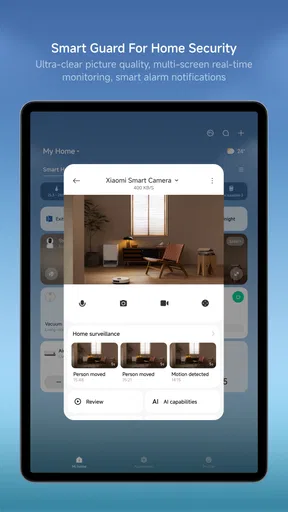
 Analysis by AppCompare
If you're like me and love having all your smart home devices under one roof, then you might want to give Xiaomi Home a try. This app has been my go-to for managing everything from my smart lights to my robot vacuum. Let’s dive into what makes this app tick and whether it’s worth your time.
What to expect when you open it
I think it helps to approach a home-control app with realistic expectations: it is a dashboard and a way to issue commands, not a guarantee that every connected device will react instantly. A screen can take a moment to refresh, and a device may need time to carry out an instruction. That distinction matters when you are deciding whether an apparent delay is the app, the connection, or the appliance itself.
For quick checks, the value is obvious: I can look at a room’s devices without walking around to inspect each one. For urgent tasks, though, I would not treat a phone interface as a substitute for a physical switch or the controls on the appliance. If a light needs to go off immediately, having a familiar manual option is still useful.
When several devices are involved
The app becomes more valuable as a home gains devices, but that is also when organization matters. I would give rooms and device names enough thought that a family member can tell what a control does at a glance. A label like “hall lamp” is more useful than a generic name, especially when several lights appear together.
One practical habit is to add and test devices in manageable batches rather than trying to arrange everything in one long session. That makes it easier to spot whether a problem belongs to one device or to the broader setup. It also gives you a chance to check that the room assignment and displayed name make sense before you build routines around them.
A routine that earns its place
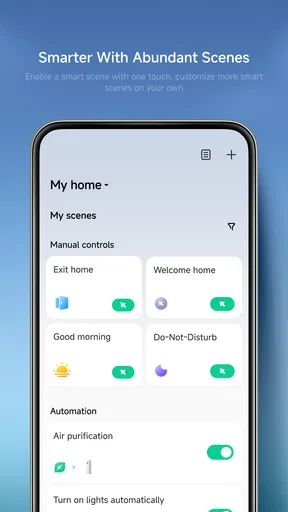
Automation is most useful when it removes a repeated decision without surprising anyone. Turning lights off when leaving is an easy example, but I would first check how the rule behaves in the household’s ordinary routine. If someone stays home, comes and goes at unusual times, or needs a light left on, an automatic action can be inconvenient rather than clever.
I’d start with one low-stakes rule and watch it for a few days before relying on it. That gives you a chance to notice a trigger that fires at the wrong moment and adjust your habits or the rule. It is also sensible to keep essential actions easy to perform manually; convenience should not make a simple task harder when a routine does not run as expected.
Worth Reading Before You Choose

Flipboard Shows What News Apps Must Do Beyond the Feed

Switching to Android Auto Means Rethinking Your Driving Routine

Google Calendar Makes a Crowded Week Easier to Manage

Ludo King Makes the Most of the Minutes Between Plans

Baby Panda World Brings Quick Play to Modern Phones, but Its Game Library Feels Busy

ESPN’s Live Game View Makes Following Close Games Easier
Getting help from the right controls
Voice control is handy for a quick command, but I see it as another route into the home rather than a replacement for the app. It works best for straightforward requests, such as adjusting a light, while the app is better when I want to inspect device status or choose a specific setting. If a command fails, checking the device directly in the app can help separate a voice-assistant hiccup from a device issue.
That distinction also helps with troubleshooting. I would check whether the device itself responds, whether its status looks current in the app, and whether the same command works when entered directly. Changing one thing at a time is less frustrating than repeatedly tapping controls or rebuilding a setup before you know where the failure occurred.
Getting Started with Xiaomi Home
First things first, setting up the Xiaomi Home app is a breeze. Available for both Android and iOS, you just need to download it from your respective app store. Once you’ve got it installed, the app guides you through the process of linking your Xiaomi devices. I found the interface intuitive, which made the setup process smooth and painless.
What I really appreciate is how the app connects to a wide range of Xiaomi products. Whether you’ve got smart bulbs, cameras, or air purifiers, the app supports them all. It even plays nice with other brands in the Mi ecosystem, which is a huge plus if you’re already invested in their products.
Features That Stand Out
One of the standout features of Xiaomi Home is its ability to create automation rules. You can set triggers based on time, location, or device status. For instance, I’ve set mine to turn off all lights when I leave the house. It’s almost like having your personal butler, minus the British accent.
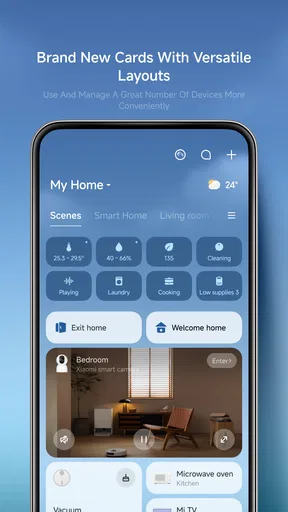
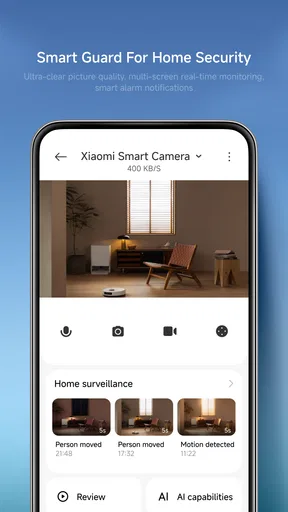
The app also offers real-time monitoring. This means you can check the status of your devices at any given time. Need to know if you left the lights on? Just open the app. This feature has saved me more times than I’d like to admit.
Another neat feature is the voice control integration. If you’re a fan of voice assistants, Xiaomi Home supports Google Assistant and Alexa. I’ve found this feature particularly useful when my hands are full, and I need to make quick adjustments.
User Experience and Design
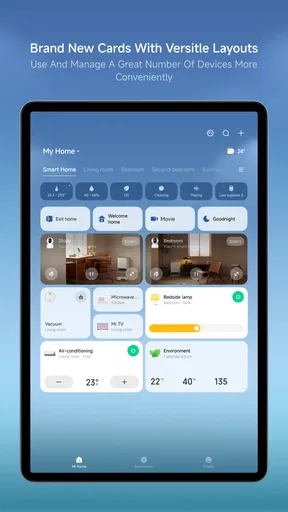
Let’s talk about the design. The app sports a clean and modern look. Navigating through the menus is straightforward, and the icons are easy to understand. The developers did a great job keeping the user interface simple yet functional.
However, like any app, it’s not without its quirks. I’ve noticed that occasionally the app can lag, especially when loading device information. It’s not a deal-breaker, but it’s something that could be improved in future updates.
Reliability when plans change
I would not judge reliability by a single slow refresh. A more useful test is whether the same device behaves consistently across repeated attempts and whether its displayed status catches up afterward. If an action appears to fail, I prefer to pause, refresh the view, and check the device itself before sending the command again. Repeated taps can create uncertainty about which instruction actually took effect.
This matters most when other people in the home also use the controls. A shared routine should be easy to understand and predictable, not a puzzle that only its creator can fix. I would keep the first automations simple, make device labels clear, and avoid building a chain of actions that would be difficult to diagnose if one part stops behaving as expected.
Security and Privacy
In today’s world, security is a major concern, especially with smart home devices. Xiaomi Home uses robust encryption to keep your data safe. I also appreciate the transparency with privacy policies, which are easy to access and understand within the app.
That being said, it’s always a good idea to regularly update your devices and the app itself to ensure you have the latest security patches. Better safe than sorry, right?
Fit for your phone and your household
Xiaomi Home is a free lifestyle app from Beijing Xiaomi Mobile Software Co.,Ltd, and its broad device focus makes it most appealing to people who already own compatible Xiaomi products. It has a 4.5 average from around 1.5 million ratings and has passed 50 million installs, so it is clearly used at scale. That popularity is reassuring as a sign that many people find the hub useful, but it does not guarantee that every device or home setup will feel equally smooth.
The app is rated for Everyone, runs on Android 7.0 or later, and its current version is 11.1.706. It is also available on iOS. I would check that your phone’s operating system is supported before building your setup around it. The app itself costs nothing to install, while in-app purchases are listed from $0.99 to $599.99 per item; that range is a reason to review any purchase prompt carefully rather than assuming every part of the experience is free.
For someone choosing between a manufacturer’s app and a general smart-home dashboard, I would begin with device compatibility. Xiaomi Home is the more natural starting point when the appliances you want to manage are already in Xiaomi’s ecosystem. A broader platform may suit a household that mixes many unrelated brands and wants one place to coordinate them, but that does not automatically make it a better controller for each individual product. Before switching, I would check which devices the alternative actually supports and what controls it exposes.
Busy evenings and heavier use
A realistic evening shows both the convenience and the limits. Imagine arriving home with shopping in hand, wanting to check a device, turn on a light, and see whether the air purifier is running. A central app saves walking from room to room, and a voice command can be useful when your hands are occupied. But if several screens are still loading, it is better to issue one command, wait for the response, and confirm the state than to tap through a queue of controls.
As the device list grows, navigation and naming become more important than adding ever more routines. I would group devices in a way that matches how the home is used, then keep the main actions easy to find. This simple housekeeping step can reduce hesitation during busy moments and makes the app less intimidating for someone who did not configure the devices.
Resource use is hard to judge in isolation because it depends on the phone, the number of devices, and what is being loaded at the time. I would not assume that a slow screen means the app is demanding too much from the phone; a network delay or an appliance response can feel similar. If performance becomes frustrating, closing and reopening the app, checking the connection, and testing one device at a time are sensible first steps before changing the whole setup.
Where it fits—and where it does not
This is a good fit if you want a single place to check compatible Xiaomi devices, make routine adjustments, and create a few useful automations. It is especially practical for someone who already owns several products from the same ecosystem and would otherwise have to open separate controls. I would also recommend it to households willing to spend a little time naming devices and testing routines, because those small choices shape how usable the dashboard feels later.
I would be more cautious if your home is built from many different brands, if you want every device to work through one universal interface, or if you rarely use phone-based controls. In those cases, a platform designed around broader cross-brand coordination, or simply each device’s own controls, may be a better match. Xiaomi Home’s strength is the convenience of its ecosystem; that same focus is a limitation when your priorities lie elsewhere.
Should You Download Xiaomi Home?
So, should you jump on the Xiaomi Home bandwagon? If you’re already using Xiaomi products, the answer is a resounding yes. The app offers a centralized hub to control and automate your smart home devices, which can make life a whole lot more convenient.
Even if you’re not a Xiaomi loyalist, the app’s compatibility with other Mi devices makes it a versatile choice. It’s got a few minor bugs, but nothing that will ruin the overall experience. Plus, the continuous updates mean it’s only going to get better.
For me, the strongest reason to keep it installed is that it brings everyday checks and repeatable actions into one place without requiring me to rethink how each appliance works. The trade-off is that I still need to pay attention to device naming, response delays, and whether a routine suits everyone at home. That is a fair exchange if the app controls products you already own, but not a compelling reason to buy into an ecosystem by itself.
In conclusion, Xiaomi Home is a solid choice for anyone looking to streamline their smart home management. It’s user-friendly, packed with features, and most importantly, it works. So why not give it a shot and see if it fits into your home automation setup?
Pros
- Intuitive user interface design.
- Wide range of compatible devices.
- Seamless device integration.
- Customizable automation rules.
- Frequent updates and improvements.
Cons
- Requires Mi account for full access.
- Limited third-party device support.
- Occasional connectivity issues.
- Complex setup for beginners.
- Notifications can be overwhelming.
FAQs for Xiaomi Home
What is Xiaomi Home and what can it do?
Xiaomi Home is a smart home management app designed to control and manage all your Xiaomi smart devices from one platform. It allows you to monitor, configure, and automate your home environment. With support for a wide range of devices, it offers features such as remote control, scheduled tasks, and device grouping for a seamless smart home experience.
Is Xiaomi Home compatible with non-Xiaomi devices?
While Xiaomi Home is primarily designed for Xiaomi products, it does offer compatibility with some third-party devices. However, to ensure full functionality, it’s recommended to check the device compatibility list within the app. This list is frequently updated to include more brands and products for a broader smart home ecosystem.
How secure is Xiaomi Home in terms of data privacy?
Xiaomi Home implements multiple layers of security to protect user data, including encryption and secure data transmission. Users are encouraged to regularly update the app and devices to benefit from the latest security enhancements. Additionally, Xiaomi is committed to transparency, often updating its privacy policies to reflect best practices.
Can I control Xiaomi Home devices remotely?
Yes, Xiaomi Home allows remote control of your devices through the app, provided your smartphone has an internet connection. This feature enables you to manage your home environment from anywhere, whether you're at work, on vacation, or simply away from home. It’s ideal for adjusting settings and checking device status remotely.
What are the system requirements for installing Xiaomi Home?
Xiaomi Home is available for both Android and iOS devices. For Android, it typically requires version 5.0 or higher, while iOS users need version 10.0 or later. Adequate storage space and a stable internet connection are also recommended to ensure smooth operation and access to all features.


